If you've been losing gunfights in Free Fire and wondering why your shots just won't land, your sensitivity settings might be the problem. It's one of the most overlooked parts of the game — and one of the easiest to fix.
Whether you're playing on a budget Android phone or a high-end iOS device, getting your free fire sensitivity settings right can make a real difference in how you play. This guide breaks down the best settings for 2026, including tips specifically for landing more headshots.
Why Sensitivity Settings Matter
Sensitivity controls how fast your crosshair moves when you swipe. Too high, and your aim goes everywhere. Too low, and you can't track moving targets. Finding the right balance is what separates players who spray and pray from those who consistently hit headshots.
And with Free Fire's OB53 update bringing new gameplay features and mechanics in 2026, it's worth revisiting your settings if you haven't already.
Understanding the Sensitivity Menu
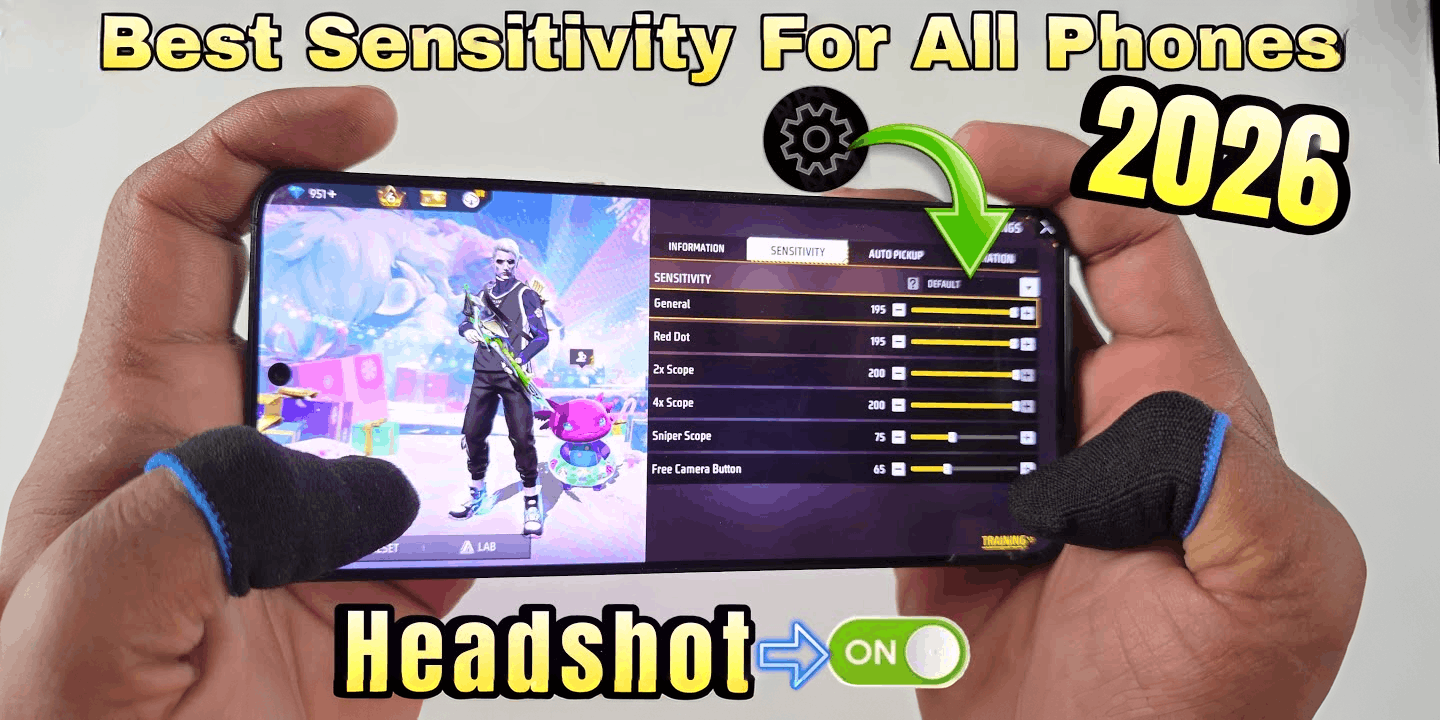
Before we get into numbers, here's a quick breakdown of what each setting actually does:
- General: Controls how fast the camera moves when you look around freely.
- Red Dot: Sensitivity when using a red dot sight.
- 2x Scope: Sensitivity when aiming with a 2x scope.
- 4x Scope: Sensitivity for 4x scope aiming.
- AWM Scope: Sensitivity for sniper scopes.
- Free Look: Controls how fast the camera rotates during free look mode.
Each of these needs to be tuned separately. A setting that works great for close-range fights might completely ruin your sniper accuracy.
Best Free Fire Sensitivity Settings for Headshots (2026)
These are solid starting points. They're based on what many pro players use and what tends to work well across different devices. Adjust slightly based on your own feel.
| Setting | Recommended Value | Notes |
|---|---|---|
| General | 100 | Keep this high for fast camera movement |
| Red Dot | 85 – 90 | Good balance for close to mid-range |
| 2x Scope | 70 – 80 | Lower for better control |
| 4x Scope | 55 – 65 | Precision matters here |
| AWM Scope | 40 – 50 | Go low for sniper accuracy |
| Free Look | 70 – 85 | Personal preference, adjust as needed |
These free fire headshot settings are designed to give you enough speed for close quarters while keeping control at range. The trick is not copying settings blindly — use these as a baseline and fine-tune from there.
Free Fire DPI Settings: Don't Skip This
Your in-game sensitivity only tells half the story. Free fire DPI settings — which you set at the device or stylus level — also affect how your touch inputs are registered.
Most players don't think about this, but it matters. Here's a general guide:
- Low DPI (below 400): Slower, more precise movement. Good for snipers.
- Medium DPI (400–800): The sweet spot for most players. Works well for all-round play.
- High DPI (800+): Fast movement. Better for aggressive close-range fighters.
If your phone supports touch sensitivity settings, try playing around with those too. Some flagship devices let you adjust touch response speed, which indirectly affects how sensitivity feels in-game.
Headshot Trick Free Fire: What Actually Works
There's no magic button for headshots. But there are a few things that genuinely help:
1. Aim for the Neck First
When you start shooting, aim at the neck area rather than the head directly. Recoil naturally pushes your aim upward, so your shots will drift toward the head. This is one of the most effective headshot tricks in Free Fire that pros actually use.
2. Use Lower Sensitivity for Scoped Shots
When you're scoped in, lower sensitivity gives you more control. Set your 4x and AWM scope sensitivity below 60 and practice holding steady before firing.
3. Practice in Training Mode
Spend time in the training ground before jumping into ranked matches. Move targets, adjust sensitivity, and repeat until the movement feels natural. There's no shortcut here.
4. Crouch Before You Shoot
Crouching reduces your recoil significantly. In close-range fights, crouching and then firing gives you a much better chance of landing headshots consistently.
5. Adjust Sensitivity After Every Major Update
Free Fire updates like OB53 can subtly change how the game feels. Check the official patch notes after each update and revisit your sensitivity settings if something feels off.
Best Sensitivity for Free Fire: Pro Player Benchmarks
Curious what the pros use? Most top-ranked Free Fire players lean toward medium-to-low sensitivity for scoped play and higher general sensitivity for movement. Here's a rough comparison:
| Player Type | General | Red Dot | 4x Scope | AWM Scope |
|---|---|---|---|---|
| Aggressive Rusher | 95 – 100 | 85 – 95 | 60 – 70 | 45 – 55 |
| All-Rounder | 85 – 95 | 80 – 90 | 55 – 65 | 40 – 50 |
| Sniper / Support | 70 – 85 | 70 – 80 | 45 – 55 | 30 – 40 |
These free fire pro settings are a guide, not a rule. Play style matters more than copying someone else's numbers exactly.
Common Mistakes to Avoid
- Setting everything to max: High sensitivity feels fast, but it destroys your accuracy. More isn't better.
- Changing settings mid-season: Give yourself time to adapt. Don't switch things up every few days.
- Ignoring device performance: If your phone lags, even the best settings won't help. Lower graphics settings first to improve frame rate, then work on sensitivity.
- Not using training mode: You need time to build muscle memory. Settings only work if you practice with them.
Quick Setup Checklist
- Open Free Fire and go to Settings → Sensitivity
- Set General sensitivity to 100
- Set Red Dot to 85–90
- Set 2x Scope to 70–80
- Set 4x Scope to 55–65
- Set AWM Scope to 40–50
- Head into training mode and practice for at least 15–20 minutes
- Play a few casual matches before jumping into ranked
- Adjust by 5 points in either direction if something feels off
Find Your Own Settings
At the end of the day, the best sensitivity for Free Fire is the one that feels right for you. Every player has a different phone, different hand size, and a different play style. Use this guide as a starting point, not a final answer.
The players who consistently land headshots aren't using some secret trick. They've just put in the time to dial in their settings and practice until it becomes natural.
Start with the numbers in this guide, spend time in the training ground, and adjust as you go. With Free Fire's 2026 esports scene growing fast — including the expanded global competition roadmap Garena announced earlier this year — there's never been a better time to sharpen your game.
Good luck out there. Stay patient, keep practicing, and the headshots will come.
No comments yet. Be the first to comment.